 Crossplay
Geyser and Floodgate, handled
Chloe, our plugin, installs them from the official builds and keeps them updated. You never download a jar or edit a config file.
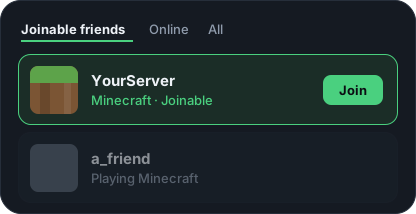
On Xbox, PlayStation and Switch, the friends list is the only way in. Crossplay puts your server there, and keeps it there.
How it works
You make a free Microsoft account for it during setup, which takes about five minutes. From then on we run it: signed in, online, and pointing at your server. There is no bot for you to host.
Your server shows up in their friends list as a game they can join. They press it and they’re in. Nobody types an address, because nobody can.
We check it every 60 seconds and bring it back when it drops. If your server or its spot on the friends list goes down, you get a message in your Discord.
Getting set up
A guided setup checks each step before the next one opens, so you never pay for something that can’t work.
You see your own server checked before you pay anything.
Free check · no account
We ping it the way a console would. If they can’t get in, we’ll tell you why, even when it’s something you can fix without paying us.
Your server’s address, like play.yourserver.com. 19132 is the usual port for console players. If your host gave Geyser a different port, use that one.
What you get
Chloe, our plugin, installs them from the official builds and keeps them updated. You never download a jar or edit a config file.
We check your server’s spot on the friends list every 60 seconds and bring it back when it drops. You never restart anything.
No BedrockConnect, no DNS tricks, no apps. They open their friends list and press Join.
Faults go to your Discord: once when it breaks and once when it recovers, not every minute in between.
See the console players who added your server and whether they got in. Block takes effect within a minute, and bans them from your Java server too.
It shows the exact gamertag to add and warns them if the server is down before they waste time trying.
Compared to everything else
| Feature | Crossplay | Changing console settings BedrockConnect |
Running your own bot on your machine |
|---|---|---|---|
| Players change nothing on their console | Yes | No | Yes |
| Geyser and Floodgate set up and updated for you | Yes | No | No |
| Checked every 60 seconds | Yes | No | No |
| Somebody else fixes it at 3am | Yes | No | No |
| No bot to host or keep signed in | Yes | Yes | No |
Console “featured servers” are the only other route, and Microsoft only approves a handful of partners for it. Self-hosted bots are good software; the difference is who gets woken up when one stops.
Read this before you pay
Crossplay uses Xbox Live services that Microsoft has never published for this, and Microsoft can change them without warning. If that ever stops console joining, it could be for a while or for good.
If it happens, we stop billing you and refund the unused period. That promise is in our refund policy, not just in this paragraph.
Pricing
One plan with everything in it.
£4.99/month
About 16p a day.
£3.99/month each
Only if you outgrow 1,000 players.
Email support@crossplay.ing to add one.
The full terms are on the refund policy page, including the cases where we probably won’t refund. We’d rather refund than argue.
Prices include VAT where applicable. Paddle is the merchant of record, so they appear on your statement and handle the tax.
Straight answers
About ten minutes. Check your server, subscribe, make a free Microsoft account for your server and enter a code, then drop one file into your plugins folder and restart. The Chloe you download is already linked to your server, so there is nothing to paste into a config file.
The setup page tells you where you are at every step, and you can close it and come back.
We have never seen it happen, and there is no reason it should: your players do nothing unusual. They add a friend and press Join, which is the ordinary use of a console friends list.
The only account doing anything unusual is your server’s own Xbox account, which is why setup asks you to make a new one rather than use your personal account. Your players’ accounts are never involved.
It uses Xbox Live services in a way Microsoft has not documented or published for this purpose. It is not a hack, an exploit of a security flaw, or a modification of anyone’s game. But it is not a supported integration either.
The honest position is the one in the section above: Microsoft can change it whenever they like, and if they do, we refund you and stop charging. We would rather tell you that than pretend there’s a partnership here.
Yes, you do, and they’re free. Geyser and Floodgate are what let a console player’s Bedrock client play on a Java server at all. We don’t replace them, and we won’t pretend to.
What we do is take the upkeep off you. Tick one box during setup and Chloe, our plugin, installs both from GeyserMC’s official builds, keeps them updated, and tells you the moment either one stops running, so you hear it from us rather than from a player who couldn’t get in.
Run the free check and it will tell you where your side stands right now.
The service runs to the end of the period you’ve paid for. After that the join account stops publishing your server, and console players can no longer get in through it. Nothing happens to your server, your world, or your Java players.
Your server’s Xbox account is yours: you made it. When your subscription ends we stop using it, and you can remove our access from your Microsoft account at any time. The details are in the terms.
Don’t, yet. The check above is free, needs no account, and tells you the truth about your own server, including when the fix is something you can do without us.
Every company we share data with is listed in the privacy policy, and you can cancel from the dashboard any time.
Setup checks your server before you pay, and takes about ten minutes.
Cancel any timeRefund if it never works